E-Commerce Invoice Format: Sample, GST Details & PDF Guide
 Bill Generator Team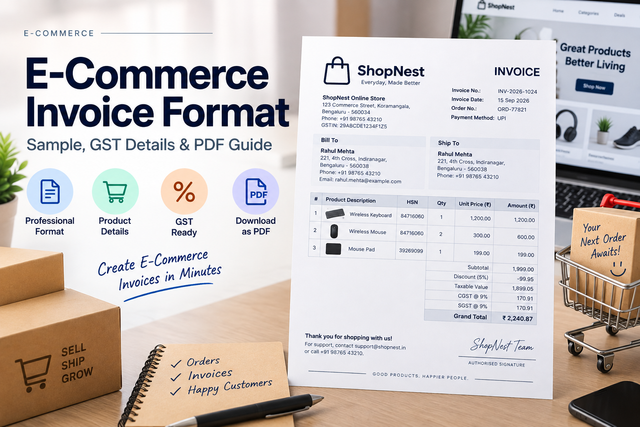
An e-commerce invoice records the financial details of a sale made through an online store, website, social-commerce channel, or marketplace.
It helps identify the seller, customer, products purchased, quantities, prices, taxes, payment information, and total amount.
For small businesses and online sellers, using a consistent invoice format can make order documentation and bookkeeping easier.
A typical e-commerce invoice can include:
Seller details
- Seller or business name
- Business address
- Contact information
- GSTIN where applicable
- Business logo
Customer details
- Customer name
- Billing address
- Shipping address where applicable
- Contact details where required
Invoice and order details
- Invoice number
- Invoice date
- Order reference
- Store, website, or sales channel
- Payment method
Product details
- Product description
- Quantity
- Unit price
- Discount where applicable
- Applicable tax
- Line total
The invoice should always reflect the actual seller and actual transaction.
A simple e-commerce invoice can look like this:
ABC Online Store
Invoice Number: INV-2026-1024
Invoice Date: 15 September 2026
Customer: Rahul Mehta
Payment Method: UPI
Products
- Wireless Keyboard - Qty 1 - Rs 1,200
- Mouse Pad - Qty 2 - Rs 300 each
Subtotal: Rs 1,800
Discount: Rs ___
Taxable Value: Rs ___
Applicable Tax: Rs ___
Final Amount: Rs ___
The seller should calculate the actual totals and applicable taxes based on the real order rather than relying on example values.
Where a GST tax invoice is required, the invoice may need to include additional business and tax information.
Depending on the transaction, this can include:
- Supplier name, address, and GSTIN
- Invoice serial number
- Invoice date
- Recipient details where applicable
- Product or service description
- Quantity
- Total and taxable value
- Applicable GST rate
- Tax amount
- Place of supply where applicable
Businesses should use their actual GST registration and transaction information rather than copying details from sample invoices.
E-commerce businesses often produce several documents during an order lifecycle.
Order confirmation
Confirms that the store has received the customer's order.
Invoice
Records the financial details of the sale and identifies the seller, customer, products, amounts, and applicable taxes.
Shipping document
Contains information needed to fulfil or deliver the order.
Payment receipt
Confirms that a payment has been received.
These documents may contain some of the same information, but they serve different purposes.
Step 1: Enter seller details
Add your business name, address, logo, and applicable tax details.
Step 2: Add customer information
Enter the customer's name and billing or shipping information required for the order.
Step 3: Add invoice and order details
Enter the invoice number, date, sales channel, and relevant order reference.
Step 4: Add products
Enter the product description, quantity, price, discount, and applicable tax information.
Step 5: Add payment information
Specify the payment method used for the order.
Step 6: Review the invoice
Check customer details, product quantities, prices, taxes, and totals before generating the document.
Step 7: Export the PDF
Save the invoice as a PDF for sharing, printing, or business records.
A reusable invoice template helps online sellers maintain a consistent structure across orders.
Instead of designing every invoice from scratch, the seller can update only the information that changes, such as:
- Customer details
- Order number
- Products
- Quantities
- Prices
- Discounts
- Taxes
- Payment method
This can be useful for smaller online businesses that need professional documentation without maintaining a complex invoicing workflow.
PDF is one of the most useful formats for e-commerce invoices because it preserves the layout across devices.
A PDF invoice can be:
- Emailed to the customer
- Downloaded after an order
- Stored with accounting records
- Printed when required
- Attached to internal order documentation
Before exporting the invoice, verify that the product details, totals, customer information, and seller details are accurate.
An invoice should clearly identify the actual seller responsible for the transaction.
If a sale took place through a marketplace, do not create a document that falsely presents itself as an invoice issued by the marketplace or another merchant.
Similarly, another company's logo, GSTIN, address, invoice number, or tax details should not be copied into a newly generated invoice unless you are authorised to issue documents on behalf of that entity.
Use an invoice generator for genuine sales and legitimate record keeping.
- Missing or duplicate invoice numbers
- Incorrect seller details
- Wrong customer or shipping address
- Product quantity not matching the actual order
- Incorrect discounts
- Incorrect tax calculations
- Missing payment method
- Copying another seller's GSTIN or branding
- Creating an invoice for a transaction that did not occur
Review every invoice before sending it to a customer or storing it as an accounting record.
What is an e-commerce invoice?
It is a document recording the financial details of a sale completed through an online sales channel.
Can I create an e-commerce invoice online?
Yes. You can enter seller, customer, order, product, payment, and applicable tax information and generate a PDF.
Can an invoice include GSTIN?
Yes, where GST information applies to the seller and transaction. Always use the genuine GSTIN belonging to the actual supplier.
Do I need a different invoice for every marketplace?
Not necessarily. The required format depends on how the transaction is structured and who is responsible for issuing the invoice.
Can I add my store logo?
Yes. A seller can add their own business logo to the invoice.
A good e-commerce invoice should make it easy to identify the seller, customer, products, prices, taxes, payment method, and final amount.
Use the BillGenerator E-Commerce Invoice Generator to enter your order details and generate a consistent PDF invoice for genuine online sales.
Generate an e-commerce invoice at: https://portal.billgenerator.in/ecom-bill/template1